The best GTA 6 settings to change first are Targeting (Lock-On, Partial or Free Aim), Aim Assist Strength, the Control Scheme (Default puts sprint on L3, Classic moves it back to X), Motion Blur and Camera Shake, plus Mute Licensed Music if you stream. Every one of them is in Pause > Settings, and you can change them at any time.
We read the menus frame by frame from two launch-day streams: GTA Series Videos went through every tab before the opening, and MELOO checked Gameplay and Display later. Below is every option we saw, its default, and what we'd set. More help on our GTA 6 guides hub.
Quick answer: our recommended settings
OUR TAKE| Goal | Setting | Default | We'd set |
|---|---|---|---|
| Easier gunfights | Gameplay > Targeting | Lock-On | Lock-On (new players) or Partial |
| Skill-based aiming | Gameplay > Targeting | Lock-On | Free Aim, Shooting Assist On |
| Old sprint button | Control Scheme | Default (L3 runs) | Classic (X runs) |
| Streaming / YouTube | Audio > Mute Licensed Music | Off | On |
| Comfort / less blur | Display > Motion Blur Strength | 3 | 0-1 |
| Comfort / less shake | Camera > Camera Shake | On | Off |
| Fewer slow-mo cuts | Camera > Cinematic Kill Shot Frequency | 3 | 1-2 |
| Get out of crouch fast | Gameplay > Stand & Sprint | Off | On |
| Throwables | UI > Projectile Arc | Off (Toggle On) | Keep, or always on |
The first-boot setup screens
ON SCREEN: seen in GTA Series Videos' launch stream- Screen Narration toggle on the boot screen (Off).
- Navigation Experience, with three choices. We saw Minimap & Compass (Dynamic) here and Minimap Always On in a second launch stream we logged.
- UI Text Size (4 sizes) and Subtitles (4 choices, including Small, Medium and Large).
- Brightness calibration: turn the slider until the dark Rockstar logo is barely visible.
- Finish Setup?: the card that says the default controls now use L3 to run and sprint, "but can be changed at any time". Press Options to open Settings first.
- Legal Terms: tick Privacy Policy and Terms of Service, then Confirm.
OUR TAKE: pick Dynamic for a clean screen (the minimap appears when it's needed or when you press the D-pad), or Always On while you learn the map. You can change it later under UI > Navigation.
Control scheme and the L3 sprint change
ON SCREEN: seen in GTA Series Videos' launch streamThe Control Scheme tab has a scheme picker (Default, 1 of 3) and a preview list of 9 entries, including On Foot, Aiming, Melee, Land / Water Vehicles, Aircraft, Bicycle, Swimming and Parachute. This is the Default On Foot map we saw on a DualSense:
| Button | On foot (Default) |
|---|---|
| L1 | Holster |
| L2 | Aim / Interact |
| R1 | Cover |
| R2 | Shoot |
| Triangle | Interact |
| Square | Melee |
| Circle | Crouch |
| Cross | Jump / Climb |
| L3 | Run |
| R3 | Look Behind |
| Left stick | Move |
| Right stick | Look |
| D-pad | Cellphone, Radio Controls, Objective / Minimap, Detonate Explosives |
| Touch pad | Map |
| Options | Pause |
The three schemes are Default, Classic and Left-Handed. Per Insider Gaming's full button tables: Classic puts Run back on X and moves Crouch to L3; Left-Handed puts Run on R3 and Look Behind on L3. GamesRadar's guide says the same: open Settings and switch the scheme from Default to Classic. We didn't see a button-by-button remap option in the tab, so the three schemes (plus your console's own system remapping) look like what you get.
OUR TAKE: should you switch?- Give Default an hour. One L3 click to run beats GTA 5's tap-X mashing.
- Switch to Classic if muscle memory wins, or your left stick's click is worn.
- Turn on Stand & Sprint (Gameplay > Movement) either way. Its on-screen description: it "stands you up automatically when activating sprint instead of staying in a crouch". It's Off by default.
Controller: sensitivity, deadzones and DualSense
ON SCREEN: seen in GTA Series Videos' launch stream| Option | Default seen |
|---|---|
| Look / Aim Sensitivity (horizontal and vertical) | 7 each |
| Look / Aim Acceleration | 7 each |
| Aim Response Curve | Standard (1 of 4): "balanced between speed and precision" |
| Inverted Controls | Movement, 3D Map Rotation, Aircraft Movement (On) |
| Vibration & Haptics Strength | 10 |
| Deadzone (Left / Right Stick) | 4 / 4 |
| Adaptive Triggers Resistance / Vibration | On / On (L2 and R2, for shooting and driving) |
| Adaptive Speed Limiter | On (shown while the triggers are on) |
| Touch Pad Button | Map (1 of 2) |
| Light Bar Effect | On: reacts "such as when you're wanted" |
The streamer turned vibration down to 0 and switched the adaptive triggers and light bar off. With the triggers off, Adaptive Speed Limiter disappears from the list (19 options drop to 18).
OUR TAKE: lower the right deadzone to 2-3 if your stick doesn't drift, keep sensitivity at 7 for your first missions, then move aim sensitivity one step at a time.
Aim assist, lock-on and combat options
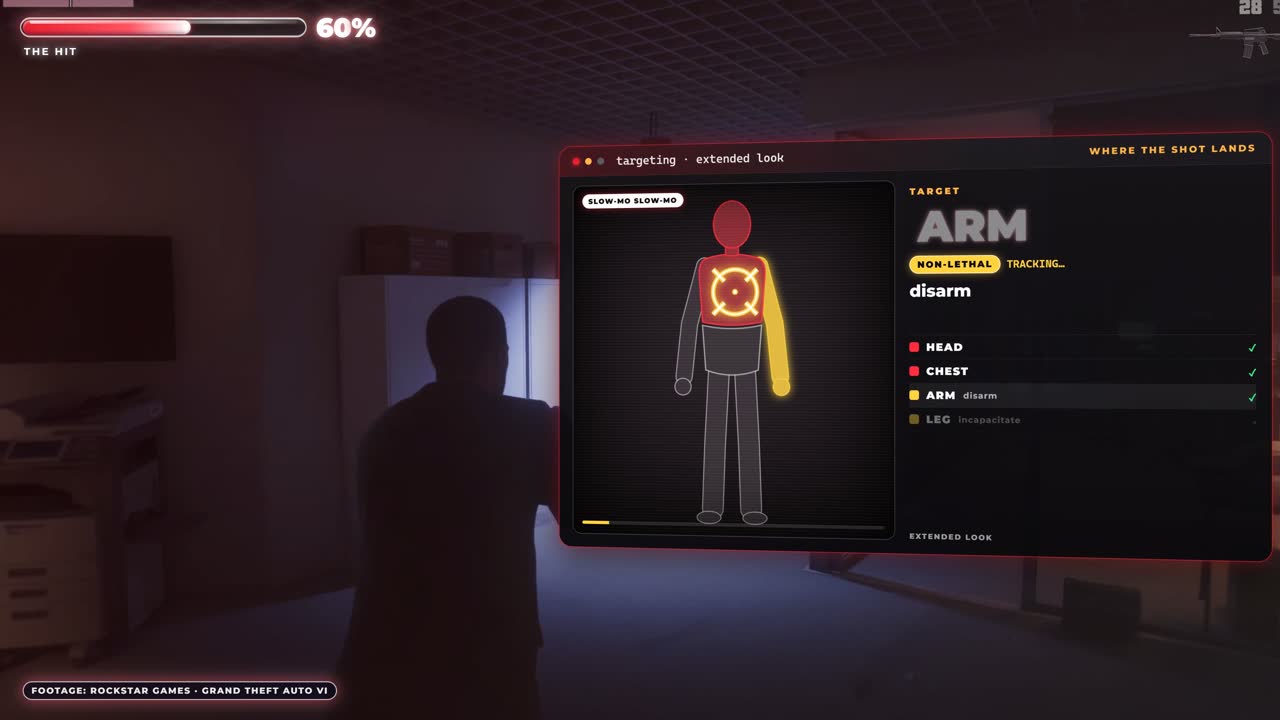
ON SCREEN: seen in GTA Series Videos' launch streamGameplay > Combat holds every aiming option. The default is Targeting: Lock-On (1 of 3). Switch to Free Aim (3 of 3) and the menu says "Aiming will never lock on to a target", and the two lock-on rows (Lock-On Time and Lock-On Target Switch) vanish, which takes the Gameplay tab from 27 options to 25. MELOO's Gameplay tab also showed 25 options.
| Option | Default seen | Notes |
|---|---|---|
| Targeting | Lock-On (1 of 3) | Lock-On / Partial / Free Aim |
| Aim Assist Strength | 4 | The slider was full at 4 on screen |
| Lock-On Time | 4 | Lock-On only. Slider sat halfway |
| Lock-On Target Switch | Off, then On | "While locked on, allows R to switch to other targets nearby" |
| Shooting Assist | On | Close-range help (see below) |
| Drive-By Assist | On | "While driving, firing a weapon auto-aims to nearby targets" |
| Quick Draw | On | - |
| Cover Selection | Camera & Movement (1 of 2) | - |
| Holster in Vehicle | Automatic (1 of 2) | - |
Both name the middle mode Partial: it slows your reticle near a target without locking on. GameRant says Shooting Assist still gives a quick lock-on to very close targets even in Free Aim, so turn it off too if you want no help at all. GamingBolt puts Aim Assist Strength at 0-5. In the stream we watched, the bar looked full at 4, so check your own slider.
OUR TAKE: best aim settings- New to GTA: Lock-On, Aim Assist at max, Lock-On Time 4+, Lock-On Target Switch On.
- Skill without snapping: Partial, Aim Assist 2-3, Shooting Assist On.
- Hardcore: Free Aim, Shooting Assist and Drive-By Assist Off, plus UI > Persistent Center Dot On.
- Leave Quick Draw On. GamingBolt notes L2 and R2 then draw your last-used weapon.
Movement and accessibility (Auto Drive, Simplified Mini Games)
ON SCREEN: seen in GTA Series Videos' launch stream and MELOO's launch stream (21178 s)| Option | Default seen | Menu text / notes |
|---|---|---|
| Movement Speed | Walk (1 of 4) | "Your max speed will be a walk when L is fully pushed" |
| Combat Movement Speed | Fast Walk (2 of 3) | - |
| Stand & Sprint | Off | Sprint stands you up from a crouch |
| Tap Assist / Hold Delay / Hold Assist | Off (1 of 5 / 1 of 11 / 1 of 4) | For mash and hold prompts |
| Focus | L3 + R3 (1 of 2) | - |
| Directional Buttons / Aiming / Interact / Loadout / Nitrous | Hold (1 of 2 each) | Hold or press |
| Fishing | Rotate (1 of 3) | Yes, fishing has its own control option |
| Simplified Mini Games | Off | "Simplifies the interactions needed for situations such as exercising, hotwiring, and basketball" |
| Auto Drive | Restricted (1 of 2) | We didn't see its description on screen |
| Auto Equip Helmet | Off | - |
| Accessible Combat | Off | - |
| Reduced Vehicle Damage | Off | "Reduces damage taken by your vehicle", with a warning that it "will significantly change the balance and experience of gameplay" |
MELOO's stream showed the same defaults for the last five rows.
REPORTED (GamingBolt)There's no difficulty setting. GamingBolt says Reduced Vehicle Damage and the accessible combat option are how you make chases and fights easier.
OUR TAKE: turn on Tap Assist if mashing prompts hurt your hands, and Simplified Mini Games if the gym, hotwiring or basketball inputs annoy you.
Visual effects: Dismemberment, Blood & Gore, Motion Blur
ON SCREEN: seen in GTA Series Videos' launch streamYes, GTA 6 has a dismemberment toggle. It's under Display > Visual Effects, and it's On by default: "Shows dismemberment for certain types of damage and injuries." Blood & Gore Intensity sits right under it, defaulting to High (3 of 3). MELOO's Display tab showed the same two defaults.
| Option | Default seen |
|---|---|
| Brightness Calibration / Safe Zone | Logo screen / screen edges |
| Player Status / Hit / Awareness Effects Intensity | 5 / 5 / 5 (full) |
| Motion Blur Strength | 3 |
| Dismemberment | On |
| Blood & Gore Intensity | High (3 of 3) |
| Flashbang | Bright (1 of 2) |
| Focus Trail Colorblind Mode | Off (boosted trail colors) |
| Brightness Reduction | Off |
The Display tab had 12 options in one stream and 13 in MELOO's, so one option may depend on your console.
Best settings for comfort and performance
ON SCREEN: seen in GTA Series Videos' launch streamCamera > Comfort holds Camera Preferences (On), Weapon Sway (On), Camera Shake (On), Camera Bob (10) and Phone Display (Default, "choose the point of view when using the phone"). Camera > Cinematic holds Cinematic Kill Shot Frequency (3), Cinematic Vehicle Crash Frequency (3) and Idle Camera (On), which "switches to cinematic views when you've been inactive for a while".
We saw no graphics or frame-rate mode in any tab. For how it runs on each console, see our Digital Foundry PS5 vs PS5 Pro breakdown.
OUR TAKE: best comfort settings- Motion Blur 0-1. Blur smears every fast camera turn. The GTA Series Videos streamer dropped it from 3 to 1 on his way through the menus.
- Camera Shake Off, Camera Bob 4-6 if you get motion sick or play close to a big screen. GamingBolt recommends Camera Shake off as well.
- Cinematic Kill Shot / Vehicle Crash Frequency 1-2. Fewer slow-motion cuts in fights and chases (GamingBolt says the sliders go up to 5).
UI, reticle and progress notifications (animals, collections, stunts)
ON SCREEN: seen in GTA Series Videos' launch streamThe UI tab is the biggest one at 70 options. The highlights:
- Readability: Language (12), UI Text Size (Small, 1 of 4), Color Adjustments, Map / Minimap Blip Size, In-World Marker Size.
- Subtitles: Mission Only (2 of 3) by default, plus Closed Captions, Size, Speaker Names (Off) and Background.
- Navigation: Minimap and Compass (both Dynamic, 2 of 3), GPS Route, Door and Interaction Markers, Altimeter.
- HUD: Help Text, Objective, Phone Notifications, Area Names (On), Street Names (Off), Wanted Stars, Heat Indicators, Money and more.
- Reticle: Persistent Center Dot (Off), Hit Markers (On), Reticle Shape (Complex, 1 of 4), Projectile Arc (Off (Toggle On), 1 of 4).
- Units: Imperial, Pounds and Fahrenheit by default, each 2 of 2, so metric is there too.
Progress notifications
The toggles are Progress Notifications, Weapons, Vehicles, Animals ("Displays a notification when a new animal is discovered"), Collections, Stunts, Basketball, Challenges and Map Updates. Weapons, Vehicles and Animals were Off when the streamer first reached them, and he switched them on a few seconds later. Challenges was Off. So GTA 6 tracks animal discoveries, collections and stunts.
OUR TAKE: turn Animals, Weapons and Vehicles On. If you're chasing the platinum, our trophy list shows what counts.
Audio: Mute Licensed Music and the best streaming setup
ON SCREEN: seen in GTA Series Videos' launch streamAudio > Setup: Mono Audio (Off), Tinnitus Reduction (Off), Controller Speaker (Off), GPS Voice (Off, 4 of 4), Mute Licensed Music (Off by default) and Vehicle Radio (Default, 1 of 3). Volume has Master, SFX, UI, Dialogue and Music (all 10).
Mute Licensed Music "mutes any licensed music", and its note adds that captions still show for music when they're on. The streamer switched it On in setup and changed it again mid-opening, so you can flip it any time.
OUR TAKE: best settings for streaming and YouTube- Mute Licensed Music On before you go live or record. Radio songs are what get VODs muted or claimed. GamingBolt recommends the same for creators.
- Subtitles and Speaker Names On for viewers watching muted.
- A lower Blood & Gore level and Dismemberment Off if your platform or sponsors are strict about graphic violence.
- Idle Camera On for free B-roll while you read chat.
Recording rules are separate: see Rockstar's spoiler video policy.
Camera settings and the pause menu
ON SCREEN: seen in GTA Series Videos' launch stream / ON SCREEN: seen in MELOO's launch streamThe Camera tab (24 options) sets height and follow speed on foot, in vehicles, in aircraft and underwater. OUR TAKE: if the driving camera fights you, lower Horizontal Follow Speed (Driver) from 10 to 6-7.
MELOO's pause menu: Map, Game, Store, Help, Photo Studio, Settings. In Settings, Restore Default (Square) resets the highlighted option, so experiment freely.
Launch-day settings guides from other outlets
REPORTED- GamingBolt: 15 settings to change before your first mission (Ravi Sinha, Nov 18).
- GameRant: best aim settings, casual and realistic (Mehrdad Khayyat, Nov 18).
- Insider Gaming: every controller scheme (Andrew Highton, Nov 18).
- GamesRadar: how to enable classic controls.
- GameSpot: GTA 6 changed the default Rockstar controls.
- Game8: best and recommended settings.
Frequently asked questions
How do you change sprint from L3 in GTA 6?
Pause > Settings > Control Scheme, then switch Default to Classic. Insider Gaming and GamesRadar report that Classic puts Run back on X (A on Xbox) and moves Crouch to L3. Left-Handed puts Run on R3.
Can you turn off dismemberment in GTA 6?
Yes. Settings > Display > Visual Effects has a Dismemberment toggle (On by default) and Blood & Gore Intensity (High by default, 3 levels). We read both on screen in two launch streams.
What is the best aim assist setting in GTA 6?
Our take: Lock-On with max aim assist if you're new, Partial with 2-3 for a fairer feel, Free Aim with Shooting Assist off for hardcore. Default is Lock-On, Aim Assist 4.
Does GTA 6 have a streamer mode?
There's no mode by that name, but Audio > Mute Licensed Music (Off by default) mutes all licensed music, and captions still show for songs. Turn it on before you stream or record.
Does GTA 6 have difficulty settings?
No difficulty setting was in the menus. The closest options are Reduced Vehicle Damage, Accessible Combat, Simplified Mini Games, Tap Assist and the aim options.
Boss fights, tier lists and comparisons for the games we play, every week on the channel.